
Restaurant Inventory Management System: Features, Cost, and POS Integration

Jul 21, 2026

Read in 5 Minutes
Table of Contents
- Introduction
- What a Restaurant Inventory Management System Does
- Core Features That Matter Restaurant Inventory Management System
- POS Integration: The Feature That Decides Everything
- What It Costs Restaurant Inventory Management System in 2026
- ROI: The Numbers Behind the Investment
- Build vs Buy: When Off-the-Shelf Stops Fitting
- Implementation Risks to Plan For
- Buyer Checklist
- Conclusion
Introduction
Food is the largest controllable cost on a restaurant’s P&L, and most of it leaks in places a spreadsheet never shows. Food and beverage costs run 28% to 35% of revenue for full-service operators. When that ratio drifts two points the wrong way, it can erase the entire net margin. A restaurant inventory management system exists to close that gap. It ties stock to sales, flags variance early, and turns counts into cost control. For many operators, a restaurant inventory management system is the first piece of back-of-house software that pays for itself.
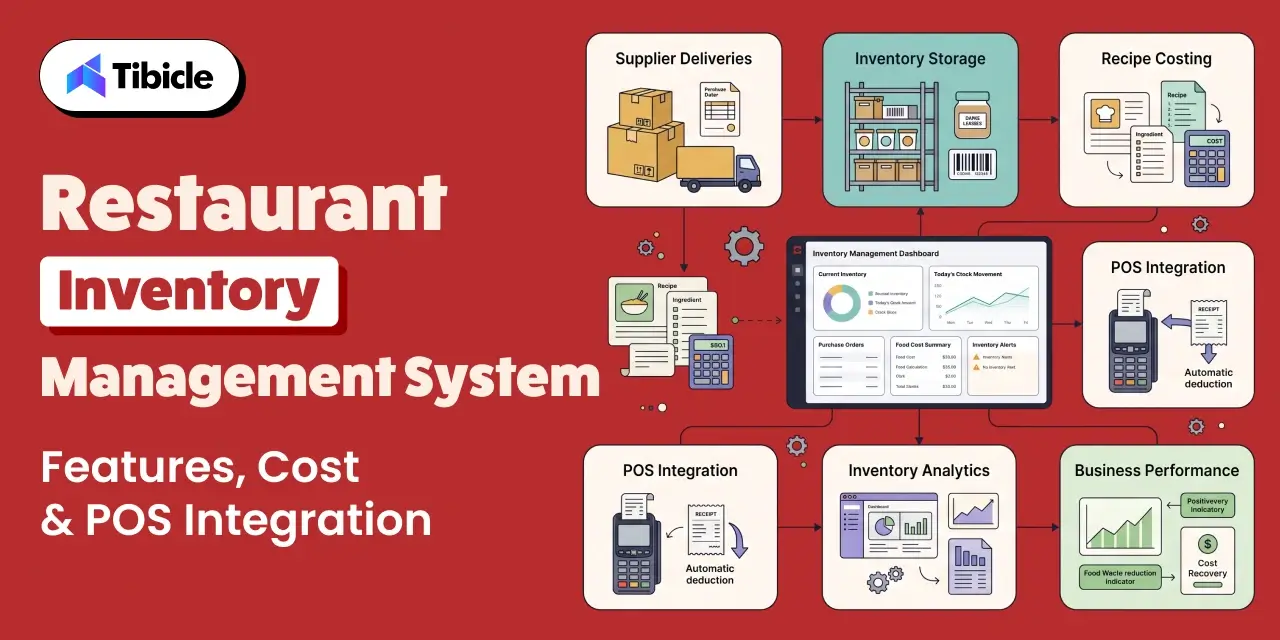
The category is growing fast for that reason. The restaurant inventory and purchasing software market rose from $3.95 billion in 2024 to $4.55 billion in 2025, and is projected to reach $9.18 billion by 2030 at roughly 15% CAGR. That spend reflects operators treating a restaurant inventory management system as core infrastructure, not a nice-to-have, and choosing restaurant inventory software over spreadsheets. This guide breaks down what a restaurant inventory management system actually does, which features move the P&L, how POS integration decides its value, what a restaurant management system costs in 2026, and how to calculate the return before you commit.
What a Restaurant Inventory Management System Does
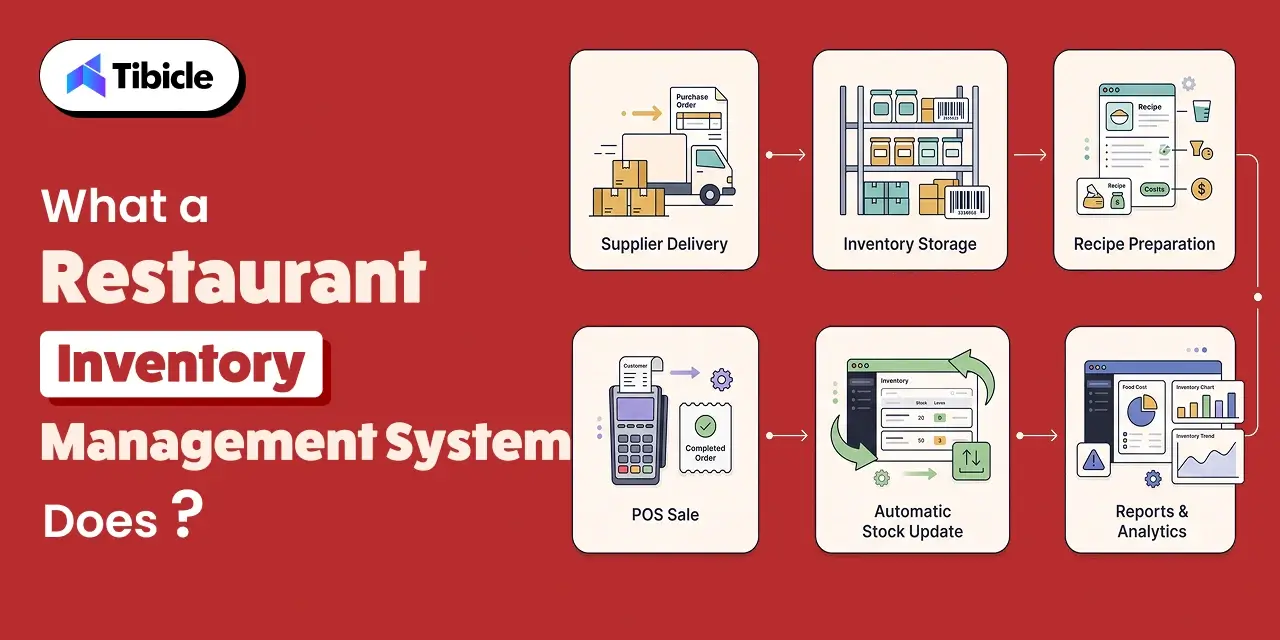
At its core, a restaurant inventory management system tracks every ingredient from delivery to plate. Operators always know what they have, what they are using, and where it is going. The difference between real restaurant inventory software and a counting app comes down to one thing. A restaurant management system connects to sales data and works out cost, not just quantity.
The workflows a restaurant inventory management system should own:
- Live stock tracking: a restaurant inventory management system counts by location, converts units for cases versus each, and handles weighted counts for proteins.
- Purchase orders and receiving: par-level reorder suggestions, vendor price tracking, and order transmission to distributors, all handled inside the restaurant management system.
- Recipe costing: cost-per-plate calculated from live invoice pricing, so you know your true margin per dish. This is what separates restaurant inventory software from a stockroom checklist.
- Variance and waste tracking: theoretical versus actual usage, which is where theft, over-portioning, and spoilage show up.
- Invoice scanning: OCR that reads paper and PDF invoices and codes them to the right accounts, a baseline expectation for modern restaurant inventory software.
Good restaurant inventory software does all five in one place. When these workflows sit in separate tools, or in a notebook updated once a week, the numbers arrive too late to act on, and the waste has already happened. A restaurant inventory management system that unifies them is what makes the data usable the same day.
Core Features That Matter Restaurant Inventory Management System
Not every feature in a restaurant inventory management system earns its keep. These are the ones that map directly to cost recovery, and the ones worth weighting most in an evaluation.
Real-Time Depletion Tied to Sales
The single most valuable capability in a restaurant inventory management system is perpetual tracking: when a menu item sells, the system deducts its ingredients automatically. This gives live stock levels instead of a weekly snapshot. A restaurant management system without this is really just a digital counting sheet.
Recipe-Level Costing and Theoretical Food Cost
Every operator tracks actual food cost. Few track theoretical food cost, which is what your food cost should be based on what you sold. A restaurant inventory management system with recipe costing computes it automatically; without recipe costing, you cannot, and without theoretical food cost, you cannot tell whether variance comes from waste, theft, portioning, or a supplier price hike. Recipe costing is the feature that turns restaurant inventory software from a tracker into a cost-control tool, and it is the reason a restaurant management system pays for itself.
Variance Reporting
Variance reporting, comparing what you should have used against what you actually used, by category and by SKU, is where the money is found in any restaurant inventory software. It is the report that justifies the whole restaurant inventory management system. A 2026 buying guide recommends investigating any category where variance creeps past 1.5% for two weeks running. That discipline is what claws back food-cost points.
Invoice Scanning and Vendor Price Tracking
Manual invoice entry is where most operators give up. In a good restaurant inventory management system, mature OCR reads an invoice in under a minute and updates ingredient costs automatically, so recipe costs stay current the moment a supplier changes prices. Without it, cost sheets go stale, and nobody notices until month-end.
Mobile Counting That Works in the Walk-In
Counts happen in freezers and basements with poor WiFi. A restaurant inventory management system needs a true mobile app with offline mode and barcode scanning, not a mobile website that stalls the moment the signal drops. This is a detail buyers skip in the demo and regret in the walk-in, and it is worth testing before any restaurant management system contract is signed.
POS Integration: The Feature That Decides Everything
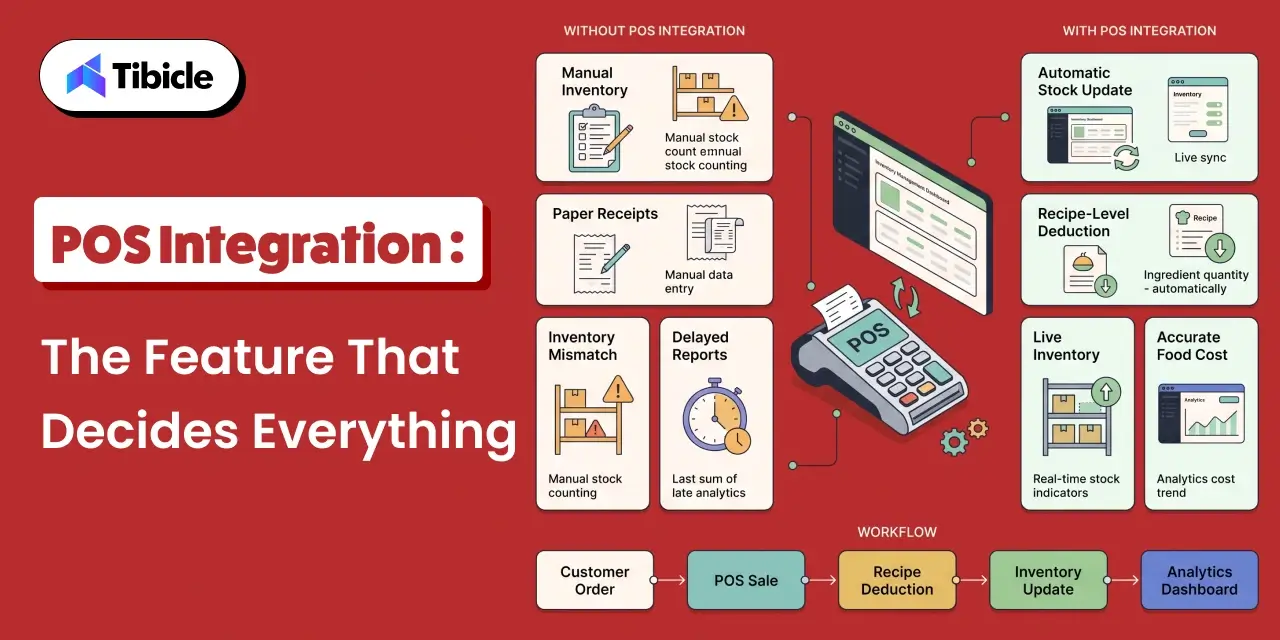
Real-time POS integration is not one feature among many in a restaurant management system. It is the feature that makes every other one work. When the point-of-sale feeds sales data into the system, depletion happens automatically, and food cost calculates in real time. Without that link, staff re-enters data by hand, accuracy drops, and the restaurant management system becomes clunky and inefficient. That is exactly the complaint operators raise when restaurant inventory software runs disconnected from the POS.
Three things to verify in a restaurant inventory management system before trusting any integration:
- Direction: is the sync two-way and automatic, or one-way and manual? Some connections only push, not pull, and a restaurant inventory management system needs the pull.
- Frequency: real-time depletion against sales, or an end-of-day batch that hands you yesterday’s problem? A restaurant inventory management system is only as current as its sync.
- Your exact POS: integration quality varies by POS, and it is the first thing to test in any restaurant inventory software. If you run Toast, a native option like xtraCHEF is seamless; for Square, the native inventory module often fits best. Confirm a reference running your exact POS version.
This is also where off-the-shelf limits show up. If your POS is proprietary or heavily customized, a standard restaurant inventory management system may not connect cleanly, and no amount of restaurant inventory software configuration fixes a missing integration. That is the point where a custom restaurant management system enters the conversation.
What It Costs Restaurant Inventory Management System in 2026
Published subscription prices are only part of what a restaurant inventory management system actually costs. Setup, per-location fees, and add-ons move the real number for any restaurant management system. The restaurant inventory software figures below reflect publicly available 2026 pricing and should frame a budget, not replace a vendor quote.
| Operation Size | Typical Cost | What You Get |
| Very small/single unit | $60 to $200 / month | Basic tracking, recipe costing, POS sync; some free starter tiers exist |
| Independent (1 to 2 units) | ~$199 to $249 / month per location | Full inventory, invoice scanning, vendor management, COGS |
| Mid-market (3 to 5 units) | ~$800 to $1,800 / month | Multi-location reporting, deeper procurement, full onboarding |
| Enterprise/custom | $2,000+ / month or scoped build | Centralized recipe library, custom integrations, ownership |
Two lines operators consistently miss when budgeting for restaurant inventory software: setup and onboarding fees, which run anywhere from $500 to $10,000 depending on scope, and the internal hours for building ingredient libraries and entering recipes, which can take 2 to 6 months for a full rollout. Watch for annual-contract lock-in too; several platforms require a 12-month commitment.
ROI: The Numbers Behind the Investment
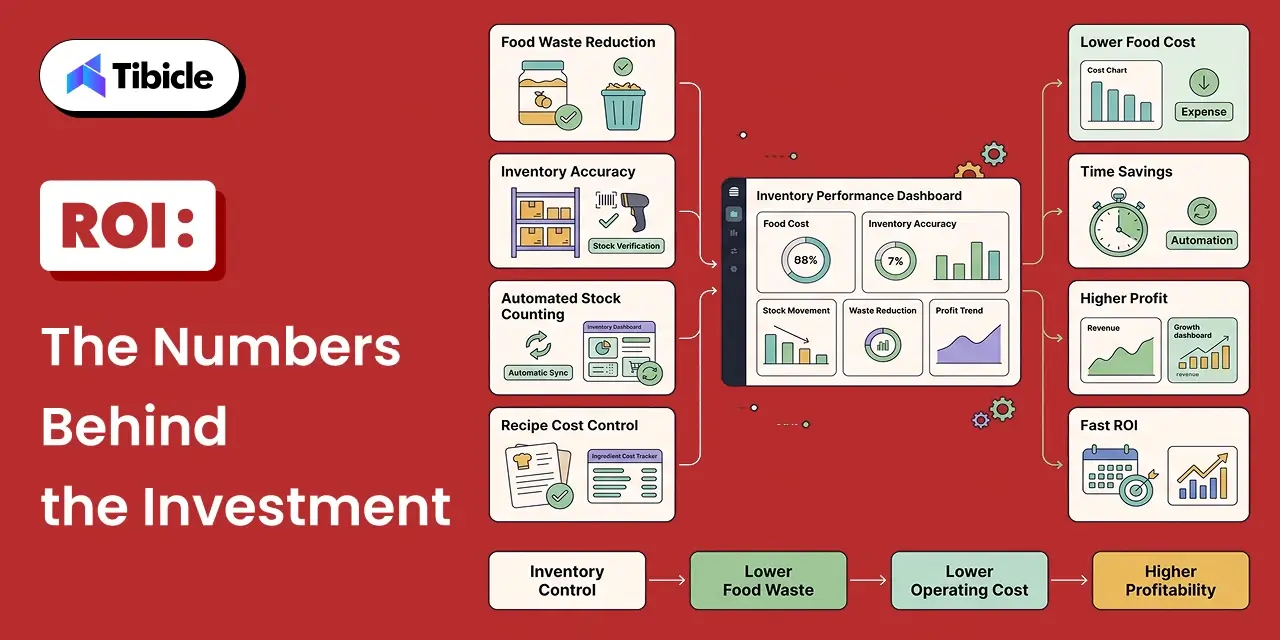
The return on a restaurant management system is measurable, and the inputs are well established. Two levers do most of the work in any restaurant management system rollout: food-cost recovery and labor recovery.
Food-Cost Recovery
Restaurants using restaurant inventory software report roughly 35% less food waste and a 2% to 5% drop in food-cost percentage, according to a 2026 inventory guide. For a restaurant doing $1 million a year at 32% food cost, cutting two points saves about $20,000 annually, often more than the restaurant inventory software and the labor to run it combined. MarketMan similarly reports operators typically reduce COGS by 3% to 5% after automating back-of-house tasks, which is the core promise of a restaurant management system.
Labor Recovery
Manual counting eats management hours every week. Moving it into restaurant inventory software cuts counting time by up to 85%, per a 2026 software overview. That recovered time, plus the accuracy gain over clipboard estimates, is labor a restaurant management system hands back to the operator every single week.
Payback
Most operators see food-cost movement within 30 to 60 days of a restaurant management system going live. On a single concept, clawing back 1 to 3 points of food cost in the first 90 days typically pays back the entire restaurant management system investment. For a five-location group doing $800,000 a month in food and beverage sales, running two points above target means $16,000 a month left on the table, which a $2,000-a-month platform can recover many times over.
Build vs Buy: When Off-the-Shelf Stops Fitting
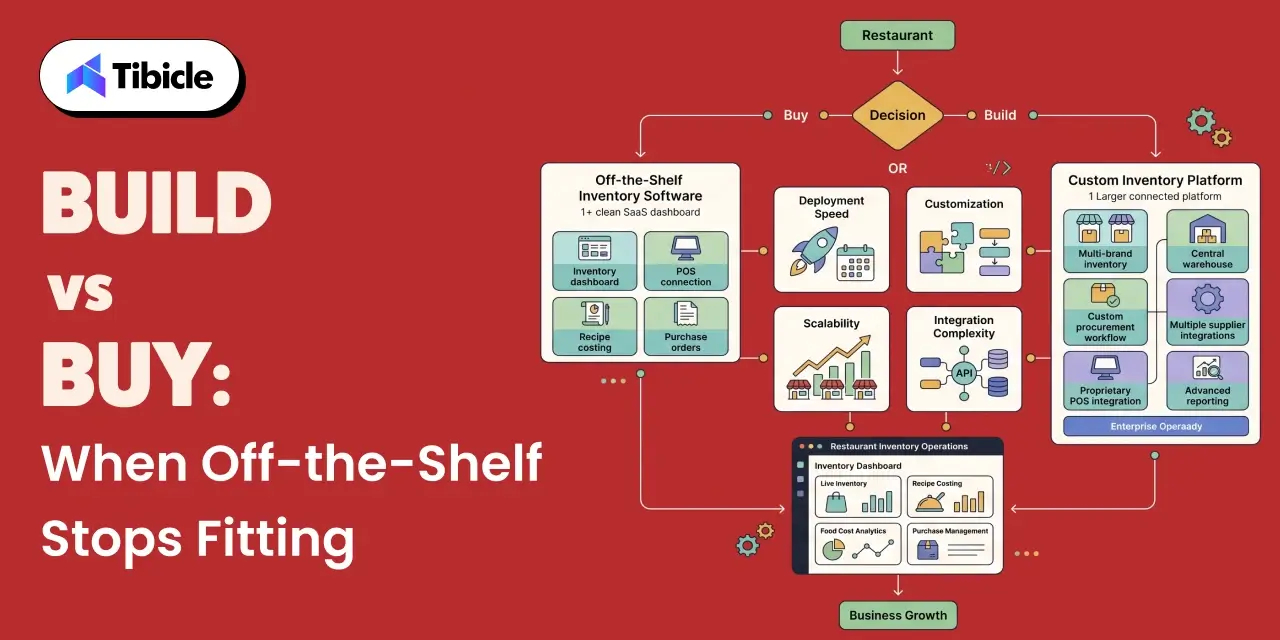
Most restaurants are well served by an off-the-shelf restaurant inventory management system. Platforms like MarketMan, Restaurant365, and Toast’s xtraCHEF cover standard operations, deploy in weeks, and spread cost across a monthly fee. A custom restaurant management system earns its place only past a clear complexity threshold, where packaged restaurant inventory software stops fitting the workflow.
- Buy off-the-shelf when: you run one to five standard locations, your POS is a mainstream platform, and your workflows fit what packaged restaurant inventory software already supports.
- Consider custom when: you run multiple brands from one kitchen, carry proprietary supplier contracts or procurement logic, or your POS resists clean third-party integration, so no packaged restaurant inventory software fits without heavy workarounds.
The tipping point is cost-competitiveness. When customizing and maintaining workarounds on a packaged restaurant inventory software approach the cost of a purpose-built one, a custom restaurant management system stops being the expensive option and starts being the efficient one.
Implementation Risks to Plan For
A restaurant inventory management system usually fails from implementation, not from a bad product.
- Data accuracy in the first 90 days: recipe libraries, unit-of-measure mismatches, and supplier catalog errors corrupt a restaurant management system early. Assign one internal owner for data hygiene before go-live.
- Staff adoption: if the kitchen team does not trust the counting workflow, counts stop happening accurately, and the restaurant management system loses its value. Budget for change management, not just setup.
- POS integration gaps: verify the connection is two-way and real-time before signing, not after. A one-way sync quietly reintroduces manual work.
- Contract lock-in and exit terms: check the minimum commitment and cancellation notice period up front, since several restaurant management system vendors enforce a full 12-month term.
Buyer Checklist
Six questions that separate a good restaurant inventory software demo from a good fit:
- Does it integrate with your exact POS, two-way and in real time?
- Does the restaurant inventory management system calculate theoretical food cost through recipe costing, not just track quantity?
- Is invoice scanning included in the restaurant inventory software, and what is the monthly scan limit?
- Is there a true offline mobile app for counting in the walk-in, as good restaurant inventory software should have?
- How does the restaurant management system price per location, and what are the setup fees?
- What is the contract term and the cancellation notice period?
Conclusion
A restaurant inventory management system earns its cost by protecting the single largest controllable line on the P&L. The features that matter are real-time depletion, recipe costing, variance reporting- all depend on one thing working: clean, two-way POS integration. Get that right, and the food-cost recovery pays the restaurant management system back inside a quarter.
For most operators, a well-chosen off-the-shelf restaurant inventory software is the right call. For those running multiple brands, custom procurement, or a POS that will not integrate cleanly, a purpose-built restaurant management system often costs less than forcing a packaged one to fit.
Weighing a custom restaurant inventory build or a connected POS? Talk to the Tibicle team, or see their guide to the best restaurant accounting software in 2026.
Frequently Asked Questions
What is a restaurant inventory management system?
A restaurant management system is software that tracks ingredients from delivery to plate, tied to POS sales, so operators see live stock, true cost per dish, and variance. It controls food cost; a basic counting app only records quantity.
How much does restaurant inventory software cost?
A restaurant management system for a very small operation costs $60 to $200 a month, with some free starter tiers. Independent restaurants typically pay around $199 to $249 per location per month for full restaurant inventory software. Mid-market groups budget $800 to $1,800, and add $500 to $10,000 for setup depending on scope.
Why is POS integration so important in a restaurant inventory management system?
Because it drives automatic depletion. When the POS feeds sales into the restaurant management system, stock and food cost update in real time. Without a two-way, real-time link, staff re-enter data by hand and accuracy falls apart.
How fast does a restaurant inventory management system pay for itself?
Most operators see food-cost movement within 30 to 60 days. Clawing back 1 to 3 food-cost points in the first 90 days typically covers the full restaurant software investment on a single concept.
When should a restaurant build custom instead of buying?
When workflows are non-standard, multiple brands from one kitchen, proprietary procurement, or a POS that will not integrate, customizing a packaged restaurant management system costs as much as a purpose-built one.
Schedule A Developer Interview And Get 15 Days Risk-Free Trial
Schedule a Call

Relevant Blog
Enterprise LLM Integration Services

Prejin Nadar

3 Best Restaurant Management App for 2026
Prejin Nadar
Written by

Recent Blogs
Enterprise LLM Integration Services
What This Guide Covers Who this is for Enterprise LLM integration services help engineering leaders, platform teams, and technology executives turn existing model access into working production workflows. This guide is for organisations connecting OpenAI, Claude, or both to systems that support real business processes, including CRM platforms, ticketing systems, document pipelines, and internal tools. […]

When to Hire an AI Software Development Consulting Firm.
What This Guide Covers Who this is for Engineering leaders, technology executives, and AI teams often struggle to turn completed initiatives into measurable results. This guide helps organisations address stalled pilots, failed AI implementations, rising costs, poor data quality, and workflows that function technically but fail to deliver measurable business value. An AI software development […]
Building Private local AI Desktop App Development
What This Guide Covers Who this is for: US tech firms, SaaS companies, startups, CTOs, engineering managers, and product teams looking for experienced Electron.js developers for ongoing private local AI desktop app development and custom desktop application development. Search intent: Hiring and decision. This guide covers where to find Electron.js developers, how to evaluate their […]
Got an Idea? Get FREE Consultation
In our world, there's no such thing as having too many clients

