
Migrate Web AI App to Electron Desktop via Electron

Oct 02, 2026

Read in 6 Minutes
Table of Contents
- What This Guide Covers
- Introduction
- Why Browser-Based AI Workflows Hit a Ceiling Before You Migrate a Web AI App to Electron Desktop
- The Real Performance Case to Migrate a Web AI App to Electron Desktop
- A CTO’s Migration Roadmap: Wrapper, Hybrid, or Rebuild
- Architecture Changes Specific to a Web AI App to Electron Desktop Migration
- Electron Adoption Context: Who’s Already Doing This
- Budgeting and Timeline for the Migration
- How Tibicle Helps You Migrate a Web AI App to Electron Desktop
- FAQ
What This Guide CoversWho this is for
CTOs, VP Engineering, and technical founders at companies running an AI feature inside a web app who are weighing whether to migrate their web AI app to Electron desktop. This applies most directly to teams where the AI workflow is central to the product, not a side feature, and where engineering leadership needs to decide between a quick Electron wrapper, a hybrid rebuild, or
holdingoff entirely.
Search Intent
Someone searching “migrate web ai app to electron desktop” is past the exploratory stage. They already run a web-based AI product, they’ve likely hit a real performance or resource complaint from users, and they’re looking for a decision framework: is this worth doing, which technical path fits their situation, and what will it cost in time and budget. They want data to justify the call internally, not a general explainer on what Electron is.
What you will walk away with:
By the end of this guide you’ll know whether your AI feature’s performance problems actually stem from the browser or from something else entirely, backed by measured latency data comparing in-browser and native inference. You’ll understand the three realistic migration paths (thin wrapper, hybrid shell, and partial rebuild), which one fits an AI-heavy product like yours, and the specific architecture changes each one requires, including how to keep your existing backend APIs and avoid building a second authentication system. You’ll also leave with realistic cost and timeline ranges pulled from industry pricing data, so you can set expectations with your team and stakeholders before committing to a build.
Introduction
A quarter of people who use browser tabs report their browser or computer has crashed from having too many open at once, according to a Carnegie Mellon University CHI 2021 study. That statistic matters more than it used to. AI features now run inference, hold model state, and stream responses inside the same browser tab competing for that memory.
Deciding to migrate a web AI app to Electron desktop used to be a product preference. It is now a resource math problem. When an AI feature needs consistent latency and local compute, the browser sandbox becomes the constraint, not the UI framework. This guide walks through why that ceiling appears, what the performance data actually shows, and how a CTO should sequence a migration: which path to choose, what changes in the architecture, and what it costs.
Why Browser-Based AI Workflows Hit a Ceiling Before You Migrate a Web AI App to Electron Desktop
Tab Overload and Resource Contention in the Browser
Modern knowledge workers keep dozens of tabs open across research, communication, and work tools. Each tab shares one process pool, one memory ceiling, and one GPU context with every other tab in the window. A Carnegie Mellon study on tab usage found that people rarely close tabs even as the number becomes unmanageable, because closing one risks losing information they can’t easily recover. That behavior means AI features don’t get a clean, dedicated environment. They compete for CPU cycles and memory against a browser session that was never built to isolate a single demanding workload.
What Happens When an AI Feature Competes for Browser Memory
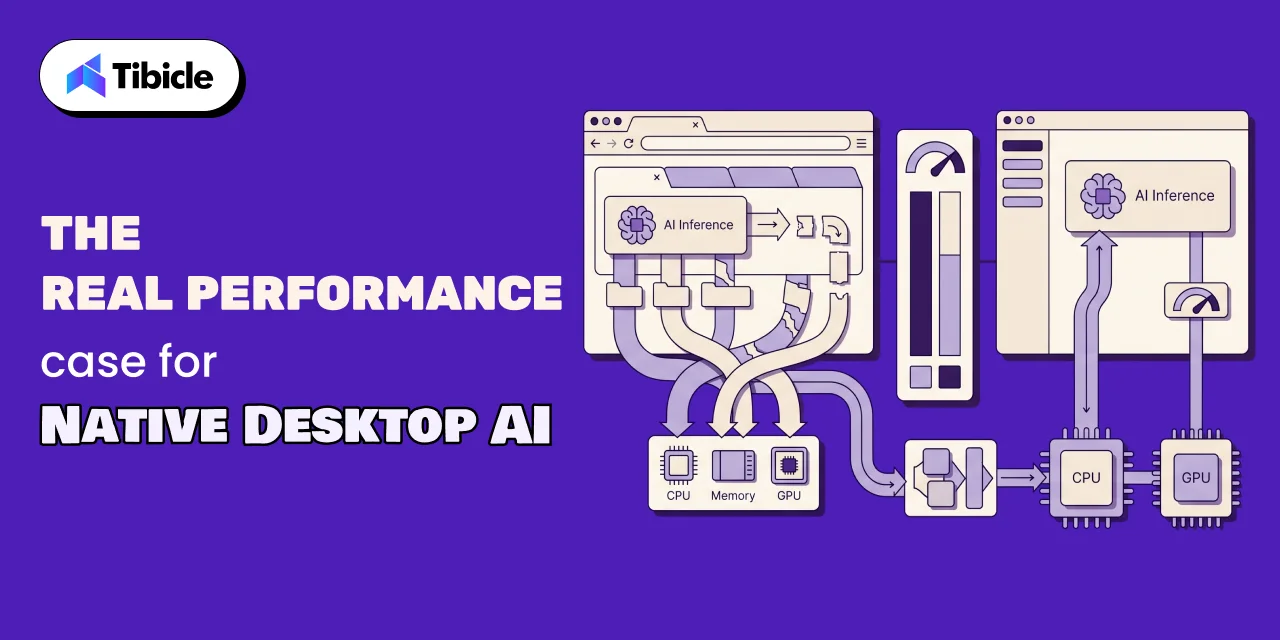
Inference workloads load model weights, run repeated forward passes, and often need low, predictable latency between input and output. In a browser, all of that shares the same process space as every other open tab, extension, and background script. Garbage collection pauses, extension overhead, and inconsistent tab throttling all sit between the AI feature and the hardware. The result isn’t a fixed slowdown. It’s variability: an AI response that took 400ms on a fresh tab can take several seconds once the same session has accumulated the normal clutter of a workday. For a chat interface, that variability is tolerable. For anything closer to real-time (voice, live transcription, on-device generation) it starts to define whether the product feels usable.
The Real Performance Case to Migrate a Web AI App to Electron Desktop
In-Browser Inference vs Native: What the Research Actually Shows
The clearest data point on this gap comes from a 2024 measurement study covering 9 deep learning models across 50 PC devices, published as “Anatomizing Deep Learning Inference in Web Browsers” in ACM Transactions on Software Engineering and Methodology. The researchers found in-browser inference runs 16.9 times slower on CPU and 4.9 times slower on GPU than native inference on the same hardware. On mobile devices the gaps were 15.8 times and 7.8 times, respectively. The same study measured memory use exceeding 334 times the model’s own size in some cases, and a 67.2% increase in the time it takes GUI components to render during inference. This is not a marginal overhead. It’s a structural limitation of running inference inside a browser sandbox.
Where WebGPU Has Closed the Gap and Where It Hasn’t
WebGPU gives browser-based inference direct access to GPU compute in a way WebGL never did, and it’s the reason the GPU-side gap (4.9x) is smaller than the CPU-side gap (16.9x) in the same study. It helps most with workloads that are already GPU-bound, like transformer inference with batched matrix multiplication. It does less for CPU-bound preprocessing, tokenization, and the browser’s own runtime overhead, including the Wasm virtual machine layer identified as a contributing factor in the same research. So WebGPU narrows the performance case for migrating, but it doesn’t remove it, particularly for CPU-heavy or latency-sensitive workflows.
When the Performance Gap Doesn’t Matter Enough to Migrate Your Web AI App to Electron Desktop
Not every AI feature needs this fix. If the product calls a cloud API and simply renders the response, the browser isn’t the bottleneck, the network round trip is, and Electron won’t change that. The performance case for native desktop applies specifically to local or on-device inference, offline requirements, or workflows where sub-second, consistent latency is part of the product’s value. A CTO should treat this migration as targeted, not automatic: match the fix to the actual bottleneck before committing engineering time to it.
A CTO’s Migration Roadmap: Wrapper, Hybrid, or Rebuild
The Thin Wrapper: Fastest Path, Least Native Benefit
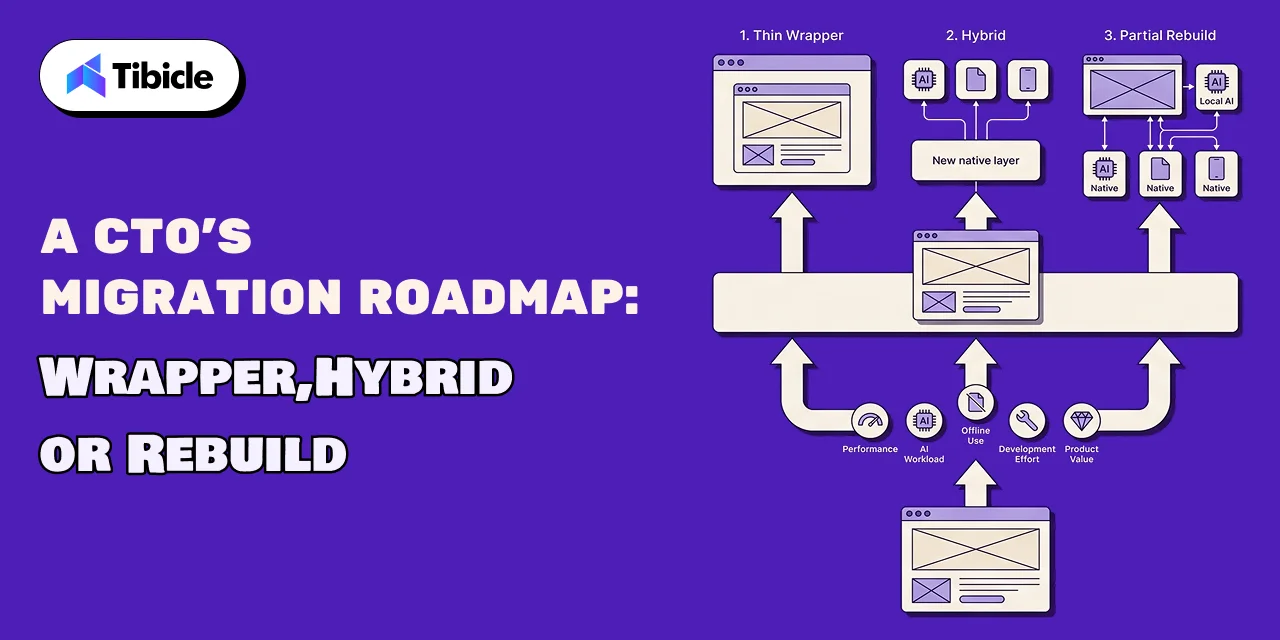
Loading the existing web app inside an Electron window is the fastest way to ship a desktop icon. AI calls stay cloud-based, and the browser-based inference limitations above still apply, because the underlying rendering engine hasn’t changed. This path works for validating desktop demand or for products where AI performance was never the bottleneck.
The Hybrid Shell: Reusing Frontend Code With Native AI Modules
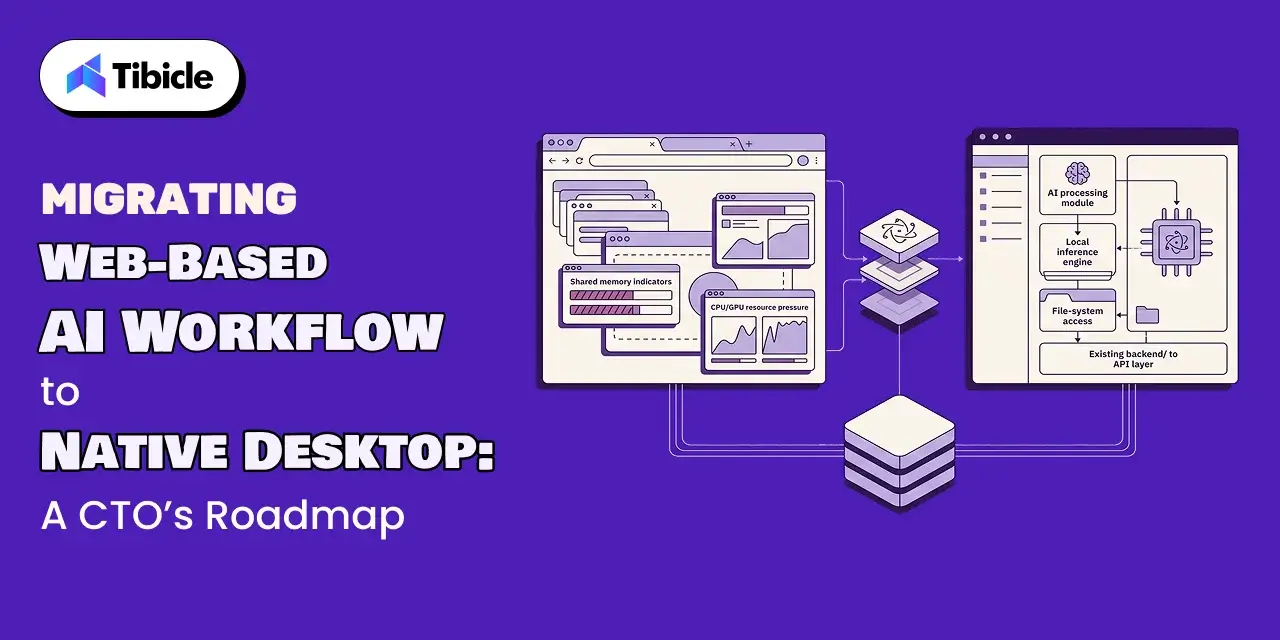
A hybrid shell keeps the existing frontend code and adds a native Electron main process that handles local inference, file system access, and hardware-level tasks. This is the path most AI-heavy web apps end up choosing, because it avoids a full frontend rewrite while still solving the actual performance problem: moving inference out of the browser sandbox.
When a Partial Rebuild Is Actually Worth It to Migrate a Web AI App to Electron Desktop
A partial rebuild, where AI-heavy screens are rebuilt specifically to call native modules and local inference directly, makes sense when AI latency or offline access is the core product value, not a supporting feature. This is the highest-cost path and should be reserved for products where the AI workflow is the reason customers pay.
| Path | What It Involves | Best Fit |
| Thin wrapper | Load the existing web app in an Electron window; AI calls stay cloud-based | Fast validation with no native performance requirement |
| Hybrid shell | Reuse frontend code; add a native main process for local inference and file access | Most AI-heavy web apps moving to desktop |
| Partial rebuild | Rebuild the AI-heavy screens to use native modules and local inference directly | Products where AI latency or offline access is the core value |
Architecture Changes Specific to a Web AI App to Electron Desktop Migration
Moving Inference From Browser JS to the Electron Main Process
The core architectural change in any hybrid or partial-rebuild migration is relocating model loading and inference calls out of the renderer process (which still behaves like a browser tab) and into the Electron main process or a native module. This is what actually captures the performance gains described above, because it removes the Wasm and browser-runtime overhead entirely rather than optimizing around it.
Reusing Existing Backend APIs While Adding Local Inference
The existing REST or GraphQL backend doesn’t need to be replaced. It stays the source of truth for account data, sync, and any cloud-based model calls, while local inference is added as a supplement for tasks that benefit from on-device speed or offline access. This keeps the migration scoped to the AI workflow rather than turning into a full backend rewrite.
Data Sync Between the Web App and the New Desktop Client
Most companies run the web and desktop versions in parallel during the transition, so the desktop client needs to read and write through the same data model the web app already uses. Building a separate desktop-only data layer creates two sources of truth and doubles the maintenance surface for no real benefit.
Key architecture changes to plan for:
- Keep the existing REST or GraphQL API as the source of truth; add local inference as a supplement, not a replacement
- Move model loading and inference calls out of the renderer process into the main process or a native module
- Reuse authentication tokens from the web app instead of building a separate desktop login flow
- Plan for users running both the web and desktop versions during the transition period
Electron Adoption Context: Who’s Already Doing This
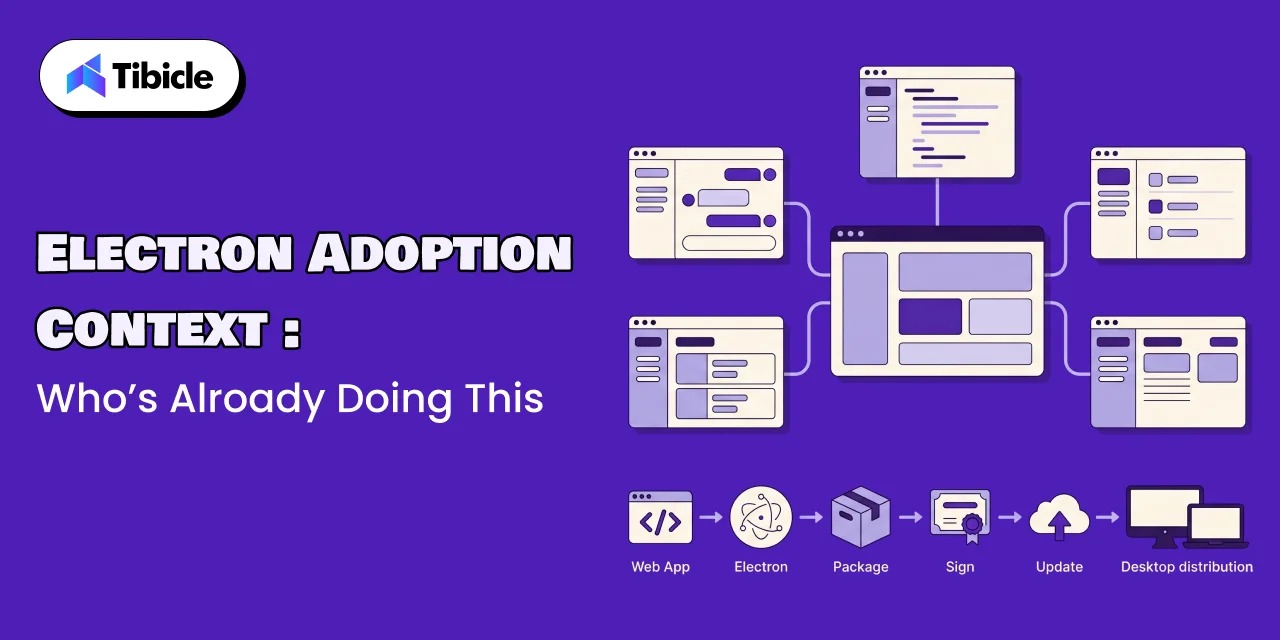
Image-Prompt:A subtle grid or network illustration made up of simple abstract application-window icons (represented as generic rounded rectangles with minimal UI lines, not real logos) connected by thin lines to suggest a broad ecosystem of adoption. One icon in the center is slightly larger and highlighted to represent a featured example, surrounded by smaller uniform icons in a soft radial layout. Flat vector style, muted corporate palette (slate, navy, off-white) with a single accent color, conveying scale and widespread industry use without naming any specific company or brand. 16:9 aspect ratio.
Companies Already Shipping AI Features in Electron
Electron is used in production by 6.5% of all developers and 6.3% of professional developers, according to the 2024 Stack Overflow Developer Survey. That places it ahead of several purpose-built native toolkits in the same “other frameworks and libraries” category, and it reflects years of production use across chat, IDE, and productivity software before AI features became part of the pitch.
What Changes for the Engineering Team Day to Day
Frontend engineers keep working in the same component code most of the time. What’s new is a main process layer that handles native calls, file access, and inference, plus a build pipeline that produces signed, distributable binaries instead of a single deployed URL. Code review starts to include process-boundary questions: does this feature belong in the renderer or the main process?
Skills Gap: Web Engineers Learning Native Packaging
The gap most teams underestimate isn’t inference code, it’s packaging: code signing certificates, notarization for macOS, auto-update pipelines, and platform-specific installer formats. None of this is hard individually, but it’s unfamiliar territory for a team that has only ever shipped to a browser, and it takes real calendar time to get right the first time.
Budgeting and Timeline for the Migration
Realistic Cost Ranges by Migration Path
Clutch’s Software Development Company Pricing Guide puts most software development projects on its platform in the $10,000 to $49,000 range, with typical hourly rates between $24 and $49 per hour, and an average project cost of $132,480 across all project sizes tracked. A thin wrapper migration sits at the low end of that range. A hybrid shell or partial rebuild with native inference work sits well above the average, closer to a full product build than a simple porting task.
Timeline Expectations for Each Migration Path
A thin wrapper can ship in a few weeks. A hybrid shell typically runs two to four months, depending on how much native module work the local inference requires. A partial rebuild of AI-heavy screens can run four to eight months or longer, closer to the 13-month average project timeline Clutch reports across its dataset.
What Extends a Migration Beyond the Original Estimate
The most common source of delay isn’t the inference code itself, it’s platform-specific packaging: code signing failures, notarization rejections, and auto-update edge cases that only appear once the app is in front of real users on real machines. Teams that budget time for this phase separately from feature development tend to hit their estimates more consistently than teams that treat packaging as a final, quick step.
How Tibicle Helps You Migrate a Web AI App to Electron Desktop
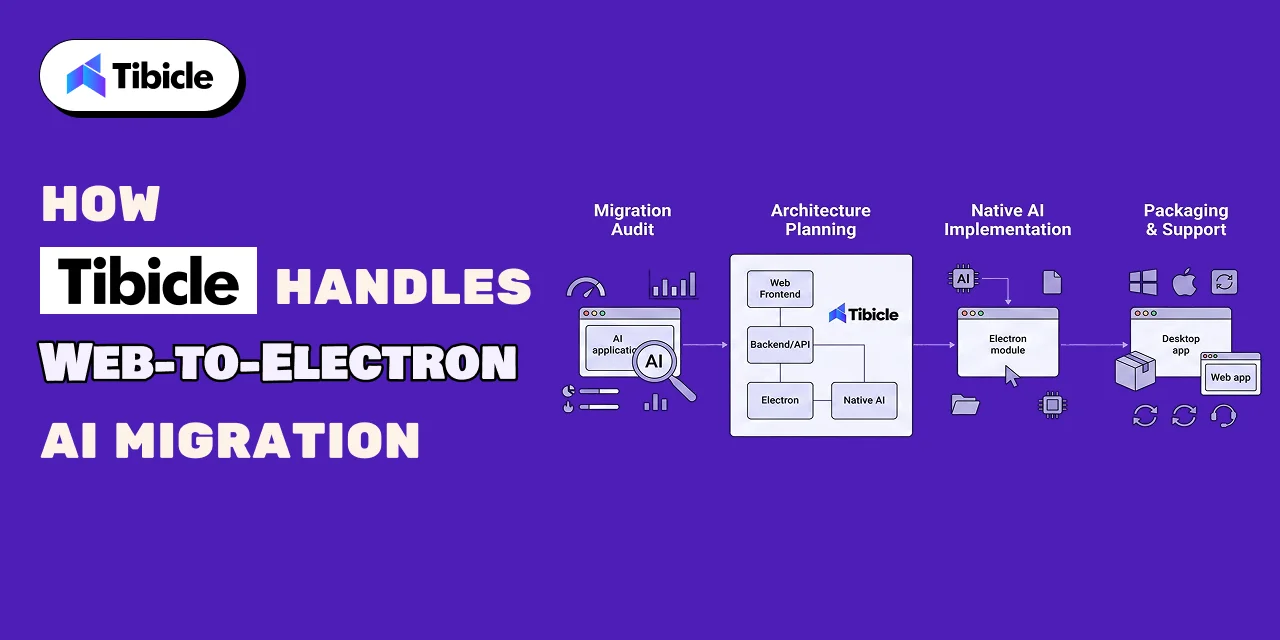
Migration Readiness Audit and Architecture Planning
Before writing any Electron code, we run a short audit of the existing web app’s AI workflows to identify which features actually hit the browser performance ceiling and which don’t. That audit produces an architecture plan showing exactly what moves to the main process, what stays cloud-based, and which migration path (wrapper, hybrid, or rebuild) fits the product.
Implementation With Native AI Inference Built In
Implementation reuses the existing frontend code wherever the architecture plan allows it, and adds native modules for inference, file access, and hardware calls where the performance case justifies it. The existing backend APIs stay in place, so the web and desktop clients read from the same source of truth throughout the build.
Packaging, Rollout, and Long-Term Support
We handle code signing, auto-update pipeline setup, and platform-specific packaging for macOS, Windows, and Linux as a dedicated phase, not an afterthought. Rollout is staged so the web version keeps running for users who aren’t ready to switch, and long-term support covers OS updates, Electron version upgrades, and native module maintenance after launch.
Key Takeaways for CTOs Planning to Migrate a Web AI App to Electron Desktop
- Deciding to migrate a web AI app to Electron desktop should be driven by a measurable performance or resource ceiling, not general momentum toward desktop apps
- In-browser inference carries a real, measured latency gap against native, even with WebGPU acceleration in play
- A hybrid shell that reuses existing frontend code while adding native inference fits most AI-heavy migrations better than a full rebuild
- Budget and timeline estimates should account for the migration path chosen, since a thin wrapper and a partial rebuild are very different projects
Ready to scope your migration? Book a call with Tibicle to get an architecture plan specific to your AI workflow.
FAQ
How much faster is native AI inference compared to running it in a browser?
Measured across 50 PC devices, native inference runs about 16.9 times faster than in-browser inference on CPU and 4.9 times faster on GPU, based on the ACM TOSEM study cited above.
Do we need to rebuild our entire web app to migrate an AI workflow to Electron?
No. Most AI-heavy web apps fit a hybrid shell approach: the existing frontend code stays largely intact, with a native main process added specifically for inference and hardware access.
Can we reuse our existing backend APIs after migrating to a desktop app?
Yes. The existing REST or GraphQL API stays the source of truth for account data and cloud-based features, while local inference is added as a supplement rather than a replacement.
How long does a typical web-to-Electron AI migration take?
A thin wrapper can ship in a few weeks. A hybrid shell usually takes two to four months. A partial rebuild of AI-heavy screens can run four to eight months or more.
What happens to users still on the web version during the migration?
Most companies run both versions in parallel, with the desktop client reading and writing through the same data model as the web app to avoid creating two sources of truth.
Does Tibicle handle migrations from web-based AI apps to Electron desktop applications?
Yes. Tibicle runs a migration readiness audit, plans the architecture, implements the native inference layer, and handles packaging and long-term support after launch.
Schedule A Developer Interview And Get 15 Days Risk-Free Trial
Schedule a Call



Written by

Aditya Changlani
Business Development Executive
I’m Aditya Changlani, a Business Development Professional at Tibicle LLP, passionate about turning conversations into opportunities and ideas into impactful digital solutions. I work closely with businesses to understand their challenges, uncover growth opportunities, and connect them with the right technology across web, mobile, AI, and custom software development. For me, business development isn’t just about making a sale, it’s about understanding people, solving the right problems, building genuine relationships, and creating partnerships that deliver lasting value.
Related posts
Enterprise AI Application Development Services: Building Custom LLM Solutions for B2B SaaS
What this Guide Covers Who this is for Product managers, CIOs, and engineering leaders at B2B SaaS companies evaluating custom AI features. Teams comparing build vs buy vs hybrid approaches for LLM integration. Companies that shipped AI pilots and need guidance on reaching production. Organizations ready to invest in enterprise ai application development services but […]
30 Sep 2026 | Dhairya Dadhania
Enterprise LLM Integration Services
What This Guide Covers Who this is for Enterprise LLM integration services help engineering leaders, platform teams, and technology executives turn existing model access into working production workflows. This guide is for organisations connecting OpenAI, Claude, or both to systems that support real business processes, including CRM platforms, ticketing systems, document pipelines, and internal tools. […]
29 Sep 2026 | Prejin Nadar
When to Hire an AI Software Development Consulting Firm.
What This Guide Covers Who this is for Engineering leaders, technology executives, and AI teams often struggle to turn completed initiatives into measurable results. This guide helps organisations address stalled pilots, failed AI implementations, rising costs, poor data quality, and workflows that function technically but fail to deliver measurable business value. An AI software development […]
29 Sep 2026 | Prejin Nadar
Got an Idea? Get FREE Consultation
In our world, there's no such thing as having too many clients

Email
tea@tibicle.com

Phone
+91 9724922880